Interface
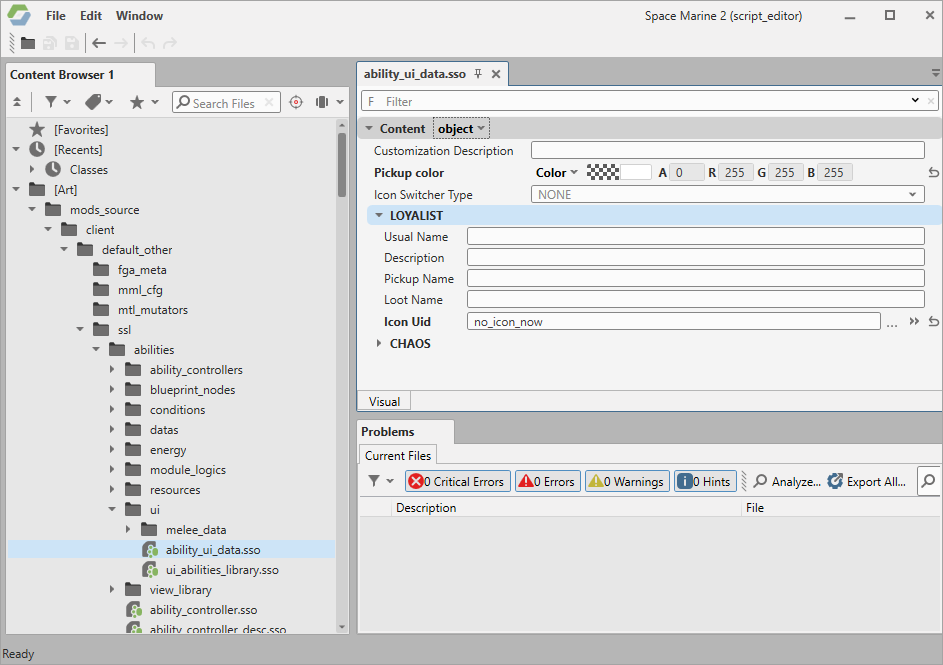
The main editor window contains the following elements:
- Top menu:
- File – main operations with files. Use File > Open file in project to browse all project source files available for editing. (!) Make sure to open only files from the
mods_sourcefolder; opening any external files may cause various problems, such as the failure to save your changes. - Edit – basic editing operations and editor preferences.
- Window – open available editor tabs or navigate between them.
- File – main operations with files. Use File > Open file in project to browse all project source files available for editing. (!) Make sure to open only files from the
- Content Browser – an interactive tree of all project files. Search and tag files, add them to favorites, and more. Hover over buttons on the top panel to see tooltips.
- File editor – settings of files you open from the Content Browser.
- Problems – an interactive log of current issues.
- Progress bar – shows the current status of an operation performed by IntegrationStudio.
Warhammer 40,000: Space Marine 2 © Games Workshop Limited 2024. Space Marine, the Space Marine logo, GW, Games Workshop, 40K, Warhammer, Warhammer 40,000, 40,000, the 'Aquila' Double-headed Eagle logo, and all associated logos, illustrations, images, names, creatures, races, vehicles, locations, weapons, characters, and the distinctive likeness thereof, are either ® or TM, and/or © Games Workshop Limited, variably registered around the world, and used under licence. Focus Entertainment and its logos are trademarks, registered or not, of Focus Entertainment. Saber Interactive and its logos are trademarks, registered or not, of Saber Interactive. Powered by Wwise © 2006 – 2024 Audiokinetic Inc. Havok software is © 2024 Microsoft. Uses Bink Video. Copyright © 1997-2024 by Epic Games Tools LLC. All rights reserved to their respective owners.