Inheritance
The SSO/PROP/CLS data can inherit data from the parent file and override it. Example:
npc_bot_marine_base_server.cls— base bot marine with bot logic.npc_bot_marine_companion1_server.cls— chiron bot (abilities and model are overridden).
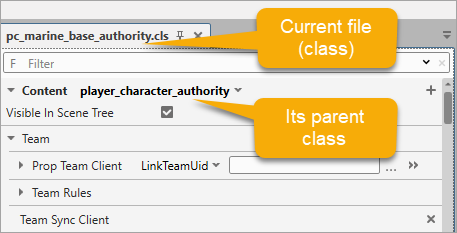
Let’s take a look at the inheritance logic using the pc_marine_base_authority.cls file as an example. This is the main, or parent, class containing settings shared by all marine characters in the game.
According to programming terminology, individual classes of Titus, Deathwatch Titus, Chairon, Gadriel, etc. are child classes of pc_marine_base_authority.
Every property defined in a parent is inherited by its children. However, a child can override an inherited property, applying a new value only for itself. In the Quick Start, you redefined the parent's Scale value of 1 with the child's value of 3. This mechanism makes it easier to distribute shared settings while allowing customization of individual actors.
The parent class of the current class is displayed at the top of the settings tab. In our example, player_character_authority is the parent of pc_marine_base_authority.
Let’s explore the inheritance mechanism in CLS, PROP, and SSO files.
-
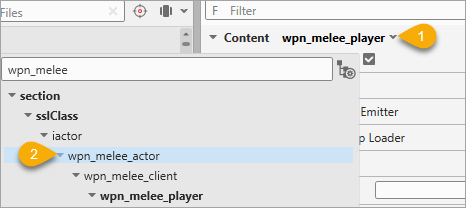
You can modify the parent classes for CLS, PROP, and SSO files. Open the file, click the Content field, and select the new type.
Now the modified game entity will follow the logic, behavior, and properties defined in its new parent class. For example, in this case we have replaced the parent class responsible for player melee weapon usage with a class that regulates melee weapon behavior for all actors (including non-playable characters).
Note
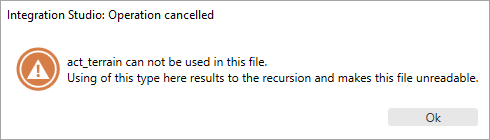
In some cases, modifying a parent class may corrupt dependent files. If this occurs, the editor will display a warning popup and cancel the operation.
Tip
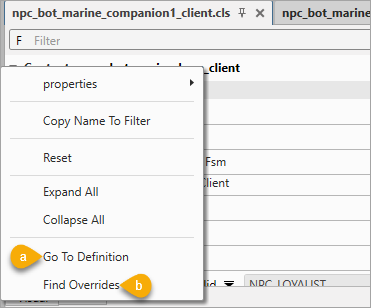
You can easily navigate the inheritance tree and find parent or child classes. Just right-click the class name, and select Go to Definition (a) to go to the parent class or Find Overrides (b) to locate child classes.
-
You can override an inherited property with a different one (for example, a more specialized implementation). The new property must inherit from the previously defined one (in the inheritance tree, child properties are nested within parent ones).
To override a property, right-click it, select Change Type, and choose the required option from the list. For example, we can replace the parent property Prop Damager with the child property
prop_damager_custom, which includes an additional set of parameters.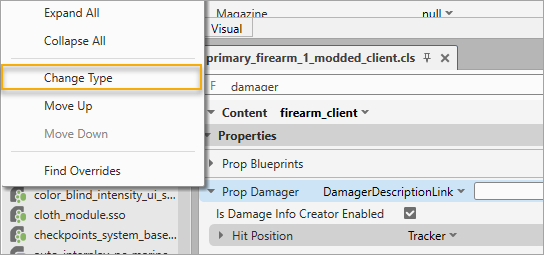
Note
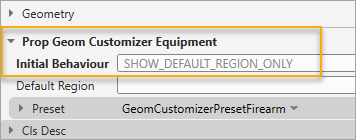
Notice how the name of a game entity is highlighted in bold after making changes? This happens every time you modify any value — the bold text helps you quickly identify which parts of the file have been edited.
Warhammer 40,000: Space Marine 2 © Games Workshop Limited 2024. Space Marine, the Space Marine logo, GW, Games Workshop, 40K, Warhammer, Warhammer 40,000, 40,000, the 'Aquila' Double-headed Eagle logo, and all associated logos, illustrations, images, names, creatures, races, vehicles, locations, weapons, characters, and the distinctive likeness thereof, are either ® or TM, and/or © Games Workshop Limited, variably registered around the world, and used under licence. Focus Entertainment and its logos are trademarks, registered or not, of Focus Entertainment. Saber Interactive and its logos are trademarks, registered or not, of Saber Interactive. Powered by Wwise © 2006 – 2024 Audiokinetic Inc. Havok software is © 2024 Microsoft. Uses Bink Video. Copyright © 1997-2024 by Epic Games Tools LLC. All rights reserved to their respective owners.