Prefab Configuration
Note
All prefabs are stored within editor_prefabs.pak.
Every level requires a player spawn point:
- For PvP configurations, refer to the
pvp_belfryexample. - For Story or PvE missions, create an Empty object and configure it as follows:
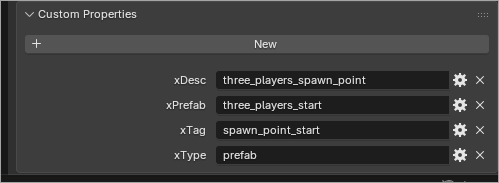
Technically, the xDesc field can be safely omitted. The xTag field is required for level scripts to locate this spawn if interaction is required. The minimal setup for any prefab requires only xType = prefab and xPrefab = <prefab_name>.
Most prefabs, such as pickups, are straightforward to place. Create a new Empty object, place it as desired, and configure it as shown below:
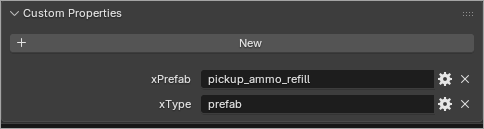
Some prefabs, like doors and usables, require additional setup for scripting. For example, a usable prefab consists of multiple objects and containers; however, the usable_server object must be tagged at root/usable/usable_server.
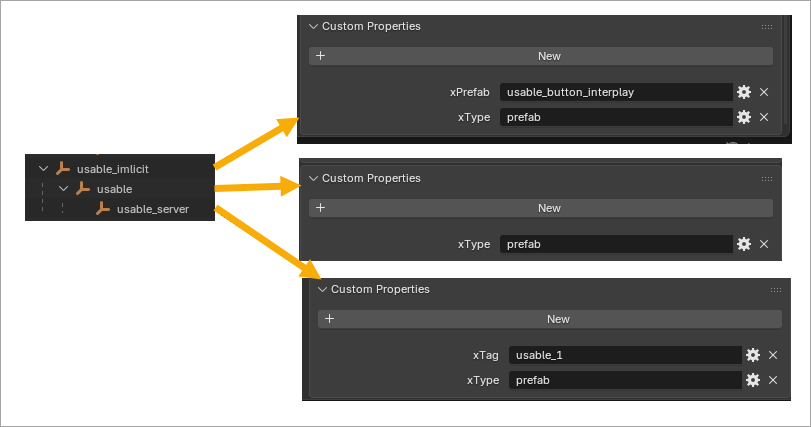
Step by step. An object named usable_implicit was first created from the usable_button_interplay prefab. Next, we navigated one layer down to the usable container; since no actions were required there, it was simply marked as xType = prefab without defining xPrefab, allowing usable to inherit its type from the prefab definition. The same process was then applied to usable_server, where the xPrefab field was omitted to inherit the type from the prefab definition, and the xTag = usable_1 field was added to enable access to this usable object from the Server Scenario.
The same can be done with door prefabs:
- Create an Empty object and assign an arbitrary name (e.g.,
door). - Configure it with xType =
prefaband xPrefab =sky_mech_door_dyn. - Inside this hierarchy, create an Empty object named
serverand configure it with xType =prefaband xTag =door_tag.
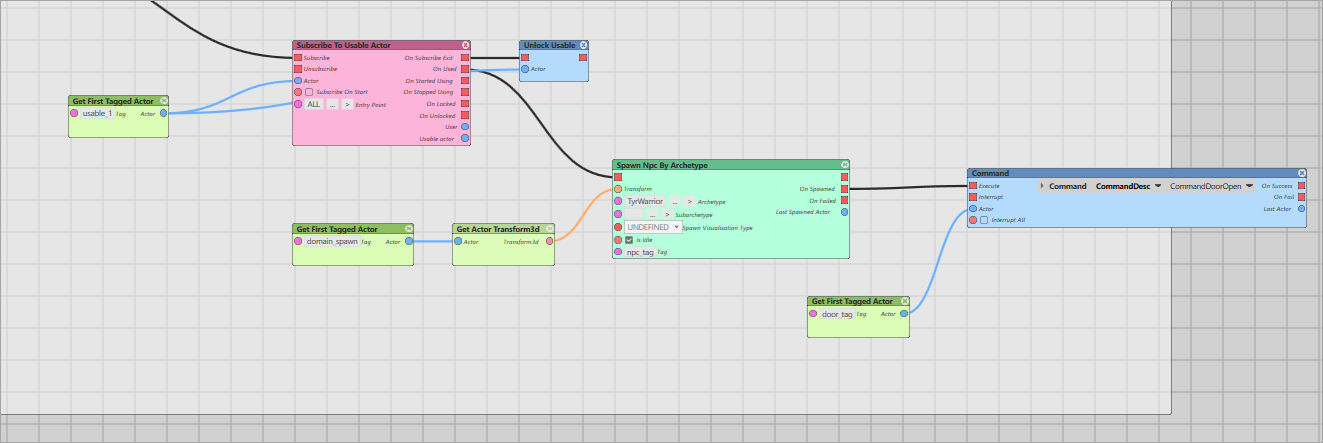
To script the interaction, use the blueprint provided in the Server Scenario. You can open and analyze it the Mod Editor. Scenarios are automatically embedded into the SCN file when the Map Converter executes.
Note
All usable objects are disabled by default and return to a disabled state after a single use. This is why we Unlock them in the scenario. Alternatively, you can check how usable_user_prefab works. This object spawns a custom-made prefab named usable_sample_always_active. For more details, check mods_source/ssl/prefabs/sample_prefabs. You can create and configure custom prefabs by creating a .prefab file into mods_source/ssl/prefabs. These do not need to bundle prefabs with your mod — they are compiled only once.
Warhammer 40,000: Space Marine 2 © Games Workshop Limited 2024. Space Marine, the Space Marine logo, GW, Games Workshop, 40K, Warhammer, Warhammer 40,000, 40,000, the 'Aquila' Double-headed Eagle logo, and all associated logos, illustrations, images, names, creatures, races, vehicles, locations, weapons, characters, and the distinctive likeness thereof, are either ® or TM, and/or © Games Workshop Limited, variably registered around the world, and used under licence. Focus Entertainment and its logos are trademarks, registered or not, of Focus Entertainment. Saber Interactive and its logos are trademarks, registered or not, of Saber Interactive. Powered by Wwise © 2006 – 2024 Audiokinetic Inc. Havok software is © 2024 Microsoft. Uses Bink Video. Copyright © 1997-2024 by Epic Games Tools LLC. All rights reserved to their respective owners.