Custom Model Without USF Template
This example demonstrates how to replace a frag grenade with a simple mesh without using a USF template. Some cases are more complex than others, but the workflow shown here can be applied to most things, from pickups to enemies.
Creating the model
- Create the new object: Add > Empty > Plain Axis and name it
tpl_desc. -
Import the example model and drag and drop it under the
tpl_descnode.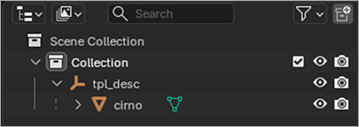
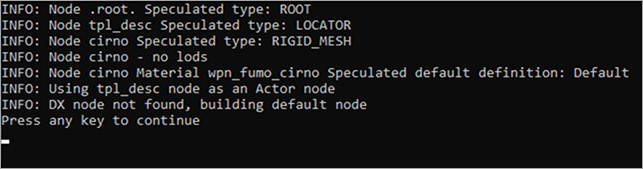
Model Converter will apply Default Flow to this model and set up all the required metadata. The process is a bit more complicated for weapons and other objects, but as long as you follow default flow requirements (read below) add all the required locators and object names (tricky part) it will work.
Adding colliders
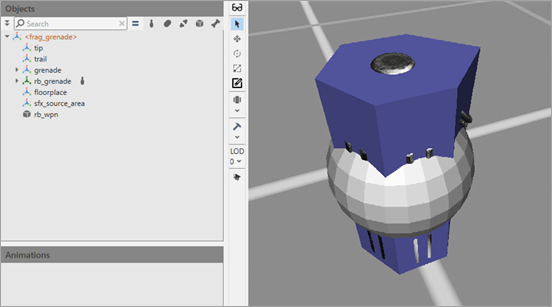
You can also add the rb_wpn and rb_grenade colliders.
Exporting the model
Export the model as wpn_fumo_cirno and run it through Model Converter and UsfExporter (including textures). You can export it with any name, but in this tutorial the default name is used. Feel free to adjust your changes to be in sync with your model name.
Integrating the model
To integrate a brand new model into the game:
- In your local folder create the
sslfolder and create theweapons\throwable\grenade\structure within it. - Open your retail game’s
default_other.pakinclientand from the same folderssl\weapons\throwable\grenade\copy thegrenade_frag_client.clsfile to your local override. Repeat the steps forgrenade_frag_client.cls.resourceinresources.pak. -
Edit the client class of the frag grenade to change its model. Open the
CLSfile (if you open it in Notepad++ you can add some QoL and set the language to C, so you can collapse sections).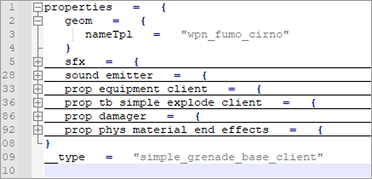
-
TPL of the frag grenade is inherited from the parent object
simple_grenade_base_client, so you can override the value by adding the following:geom = { nameTpl = “wpn_fumo_cirno” } -
Edit resources for this CLS. The resource system must know what assets to load when this class is used. Open the
.resourcefile and edit it, so it looks like it is displayed on the screenshot below. This way you tell the resource system to load a resource file of the related TPL file by this path.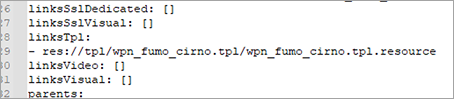
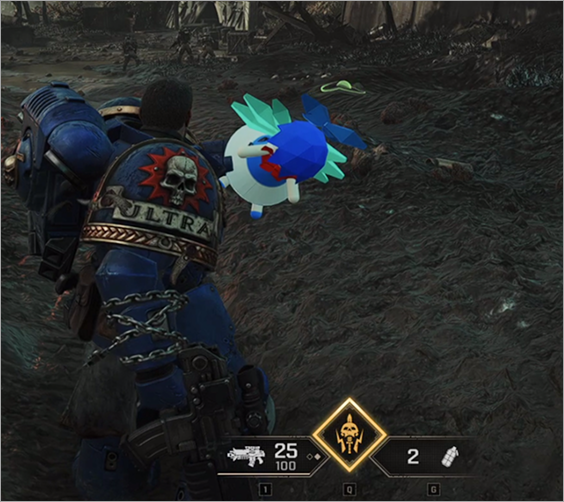
The new model in game:
Warhammer 40,000: Space Marine 2 © Games Workshop Limited 2024. Space Marine, the Space Marine logo, GW, Games Workshop, 40K, Warhammer, Warhammer 40,000, 40,000, the 'Aquila' Double-headed Eagle logo, and all associated logos, illustrations, images, names, creatures, races, vehicles, locations, weapons, characters, and the distinctive likeness thereof, are either ® or TM, and/or © Games Workshop Limited, variably registered around the world, and used under licence. Focus Entertainment and its logos are trademarks, registered or not, of Focus Entertainment. Saber Interactive and its logos are trademarks, registered or not, of Saber Interactive. Powered by Wwise © 2006 – 2024 Audiokinetic Inc. Havok software is © 2024 Microsoft. Uses Bink Video. Copyright © 1997-2024 by Epic Games Tools LLC. All rights reserved to their respective owners.