Combat Knife
This example covers locators, rigid bodies, and LODs while adding minor changes to the Combat Knife.
Importing to Blender
Follow the steps described in the Imperial Barrel example, to convert the model's USF file and import it into Blender.
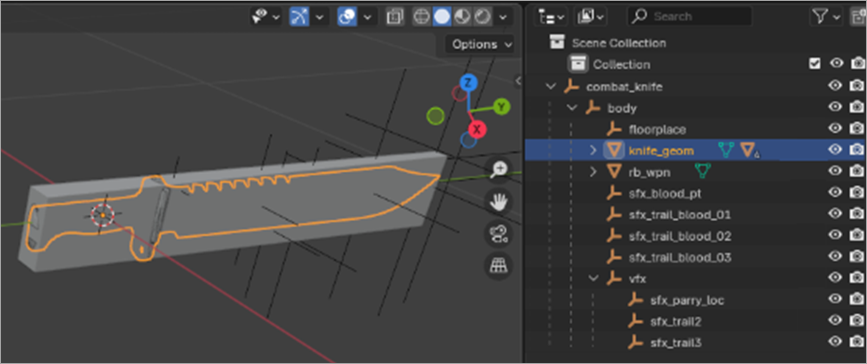
Hierarchy:
floorplace— locator for animations.sfx\vfx— locators for visual effects. SFX is a deprecated abbreviation for Special Effects, but it collides with Sound Effects.knife_geom— visual geometry of the knife.rb_wpn— collider mesh.
Click the Eye icon on rb_wpn to hide the collider.
Adding the Curve modifier
-
Add the Curve modifier to
knife_geomand use the default bezier curve (rotate and scale it until it looks good).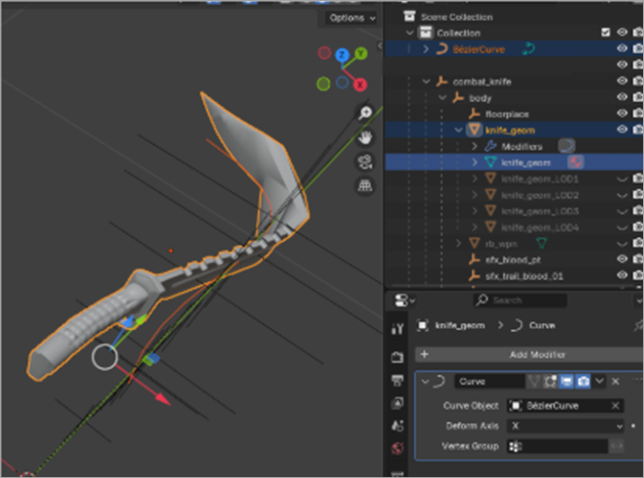
-
Add the same modifier to all LODs, apply all modifiers and move
knife_geomback to zero coordinates. - Optional: you can morph and adjust “rb_wpn”
- Export the model to the game following the process from the Imperial Barrel example. Note that in this example no custom textures and materials are used, so you only need to export the model as
GLTF, convert it toUSFand then toTPLand import it into the game.
Warhammer 40,000: Space Marine 2 © Games Workshop Limited 2024. Space Marine, the Space Marine logo, GW, Games Workshop, 40K, Warhammer, Warhammer 40,000, 40,000, the 'Aquila' Double-headed Eagle logo, and all associated logos, illustrations, images, names, creatures, races, vehicles, locations, weapons, characters, and the distinctive likeness thereof, are either ® or TM, and/or © Games Workshop Limited, variably registered around the world, and used under licence. Focus Entertainment and its logos are trademarks, registered or not, of Focus Entertainment. Saber Interactive and its logos are trademarks, registered or not, of Saber Interactive. Powered by Wwise © 2006 – 2024 Audiokinetic Inc. Havok software is © 2024 Microsoft. Uses Bink Video. Copyright © 1997-2024 by Epic Games Tools LLC. All rights reserved to their respective owners.